Race Monitor
Race MonitorSports
3.5348.00 Reviews
- Version
- Varies With Device
- Installs
- 500.00K
- Age Rating
- Everyone
Screenshots
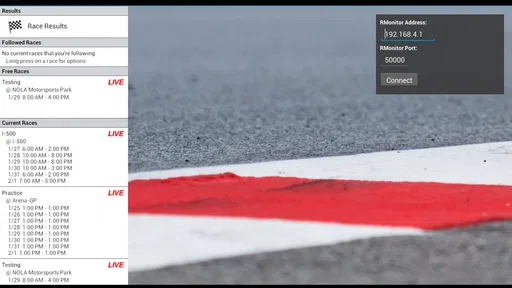
Our Review of Race Monitor
 Analysis by Appyee
I tend to get the most out of a race when I know what I’m following before the start: the event, the drivers or entries I care about, and the kind of updates that will actually help me keep up. Race Monitor is built around that habit. It brings live timing for races to a phone, which makes it useful when the track is far away, the broadcast is focused elsewhere, or I simply want a quick way to check how a race is unfolding. It is a sports app from Race Monitor, and its appeal is clearest for fans who enjoy following the detail between the headline moments.
A simple routine for following an event
My practical starting point is to open the app before the action gets busy, find the event I want to follow, and decide what I’m hoping to learn from it. Live timing is most valuable when I have a question in mind: Has a driver moved up? Is a gap changing? Did a fast lap alter the order? That small bit of preparation makes the screen feel like a useful companion rather than a stream of figures to watch without context.
When I’m away from a television, I’d keep the app close and check it at natural breaks instead of staring at it continuously. At a track, that might mean looking during a pause in the viewing action; at home, it might be a quick glance while making food or stepping away from the broadcast. Timing information works well alongside watching, but it does not replace the visual story of a race: traffic, mistakes, weather, and the reason a position changed are easier to understand when you can see the cars or hear commentary.
Getting Started with Race Monitor
First things first, setting up Race Monitor is a breeze. The app is available on both Android and iOS, and downloading it is as straightforward as grabbing a cup of coffee. Once installed, you're greeted with a sleek interface that screams "racing" from the get-go. The navigation is intuitive, making it easy to find your way around, even if you're not a tech whiz.
Creating an account is optional, but it enhances your experience significantly. By signing in, you can personalize settings and bookmark your favorite events. Trust me, having those preferences saved is a lifesaver when you're following multiple races across different leagues.
The Features That Fuel Your Passion
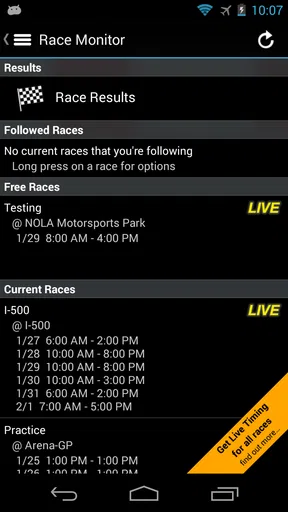
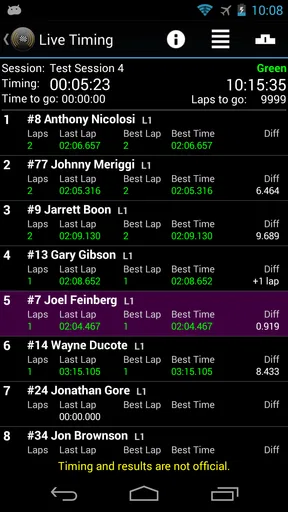
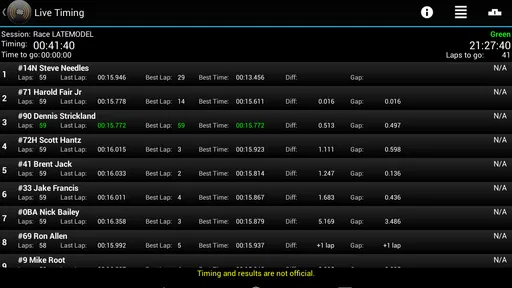
The heart of Race Monitor lies in its live timing feature. It allows you to view real-time race data, including lap times, driver positions, and even sector times. This is perfect for those nail-biting moments when every millisecond counts. I found myself glued to the screen, especially during the last few laps of any race.
Another cool feature is the race replays. Missed the live action? No worries! You can replay the race at your convenience. The graphics and data presentation are top-notch, offering a near-live experience even during replays.
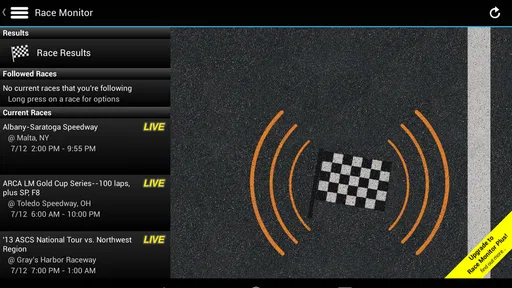
For those who love variety, the app covers a wide range of motorsport events, from karting and drag racing to endurance racing and everything in between. It's like having a pit pass to every event worldwide.
Choosing what deserves your attention
Notifications are most useful when they answer a question I genuinely care about. If I am following a single driver, an alert about that driver can be more helpful than trying to track every change across a field. If I am watching a close fight, broader race developments may matter more. I’d start with only the alerts I expect to act on, then adjust after a session; too many notifications can turn a handy timing tool into background noise.
Before relying on an alert, I’d also check that I have selected the right event and that the app is available to send notifications on my device. A phone’s own notification controls can affect what comes through, so a quiet phone does not necessarily mean the race has stopped producing updates. This is a useful distinction when following a session from work or while moving around: use the app for focused checks, and treat notifications as prompts rather than a complete substitute for checking the timing screen.
Stay Connected with Race Alerts
One of the standout features for me is the race alerts. You can customize notifications for your favorite events, ensuring you never miss a beat. Whether it's a position change, a new fastest lap, or race results, you'll be the first to know. It's like having your own personal pit crew updating you in real-time.
These alerts are customizable, so you can choose to be notified about specific events or drivers. It's a neat way to manage the influx of information and focus on what matters most to you.
Habits that make timing easier to read
A repeatable routine helps more than trying to interpret every number at once. I’d begin with position and lap context, then look at lap times or sectors when I want to understand whether a change reflects pace or a momentary reshuffle. In a long race, comparing a driver’s recent laps with the wider order can be more revealing than reacting to one quick split. A single fast lap is interesting; a pattern across several updates is usually more useful.
If I’m keeping an eye on several events, I’d use saved events as a short list rather than treating the app as a catalogue to browse during the race. The trade-off is that a saved choice helps me return quickly, but I still need to confirm I’m looking at the correct session before drawing conclusions. Similar event names or multiple classes can make a timing screen confusing if I jump in halfway through, so checking the event context first is a good habit.
A realistic day with the app
Imagine I’m spending a Sunday afternoon away from the television while a race I care about is underway. I can open the event before leaving, keep the relevant timing available, and check it during a break. If the order changes, I can use lap and sector information to see whether the shift looks like sustained pace or simply a brief fluctuation. Later, if I missed the live action, I can return to the replay option described in the app’s feature set. That is a more practical role than expecting a phone display to recreate the atmosphere of being trackside.
For a friend who only follows a major series when it is on television, I would not insist on installing another app. A broadcast already gives the broad story, and its commentary may explain strategy more clearly. But for someone who watches smaller events, follows a particular competitor, or wants to stay oriented while doing something else, live timing can fill a real gap. The best fit is a fan who enjoys numbers as a way to add context, not someone who finds timing tables tiring.
Where it fits among other ways to follow racing
Compared with a general sports-news app, a dedicated timing app is better suited to checking the progress of a race while it is happening. News apps are often more convenient for headlines and summaries after the fact; a television or video stream is better for seeing the on-track action; and a series’ own coverage may be the clearer choice when I want official context for one championship. Race Monitor makes most sense when I want race-by-race timing in one place and am willing to follow the event through data rather than video.
That focus also sets a limit. Live timing cannot tell me everything that caused a gap to open, and a number on a screen can be easy to misread without knowing the session format or what is happening on track. I would use it alongside a broadcast, event information, or my own knowledge of the series when a detail matters. It is a companion for following progress, not a replacement for every other source of race coverage.
Costs, access, and expectations
The app is free to install, with optional in-app purchases priced from $0.99 to $6.99 per item. That gives a new user a straightforward way to try it before deciding whether any paid option is worthwhile. I’d first see how often the events I care about appear and whether the free experience suits my routine; there is little reason to spend before I know that the app fits the way I follow racing.
It is rated for Everyone, has been available since December 26, 2010, and has more than 100,000 installs. Its average rating is 3.4 from around 1,700 ratings, with 347 written reviews. I take that rating as a reminder to keep expectations practical: a focused timing app can be valuable to the right fan without being the best choice for every kind of motorsport follower. Race Monitor is a stronger prospect for someone who will return to live timing than for someone looking for a polished video destination or a general-purpose sports feed.
A Community for Racing Fans
Beyond the live data, Race Monitor fosters a sense of community. The app connects you with other racing enthusiasts, allowing you to share insights and discuss races in real-time. It's like being in a virtual grandstand, surrounded by fellow fans.
If you're into social media, the app also integrates with platforms like Twitter, letting you share your thoughts and engage with a broader audience. It's a wonderful way to keep the conversation going long after the checkered flag has waved.
Who I would recommend it to
I’d recommend it to someone who follows races that are not always easy to watch, wants to keep tabs on a driver or event, or enjoys comparing lap and sector pace. It can also help a group of friends follow the same race when they are not in the same place: one person can watch, another can check timing, and they can compare what they see. That works best when everyone is discussing the same event and session, rather than passing around isolated numbers without context.
I’d suggest skipping it if your main need is live video, in-depth race analysis, or a simple post-race news recap. Those are different jobs, and timing data alone can feel sparse if you do not enjoy tracking positions and pace. For a newcomer to motorsport, I’d pair it with a broadcast or a knowledgeable guide to the series; for a seasoned fan, the timing view may be enough to make a familiar event more engaging.
Final Thoughts
In a nutshell, Race Monitor is a fantastic companion for anyone who lives and breathes motorsport. Its user-friendly interface, comprehensive features, and community engagement make it a standout in the realm of racing apps. Whether you're a casual fan or a hardcore enthusiast, this app will keep your adrenaline pumping from start to finish.
So, if you haven't already, give Race Monitor a spin. Trust me, once you start using it, you'll wonder how you ever followed races without it. Happy racing!
Verdict
Strengths of Race Monitor
- Real-time race updates enhance engagement.
- User-friendly interface for easy navigation.
- Broad coverage of various racing events.
- Customizable notifications to track favorites.
- Supports both Android and iOS platforms.
Limitations of Race Monitor
- Occasional lag in live data updates.
- Limited features on free version.
- Requires stable internet for optimal use.
- Some users report occasional app crashes.
- Ads can be intrusive in free mode.
Similar Picks in This Category
View All
BeSoccer: Soccer Live Score
BeSoccer apps4.3

Cricbuzz - Live Cricket Scores
Cricbuzz.com3.7

NFL
NFL Enterprises LLC2.4

Da Fit
MO YOUNG LIMITED3.6

ESPN
Disney4.5

LiveScore: Live Sports Scores
LiveScore Limited4.5
Frequently Asked Questions
What is Race Monitor and how does it work?
Race Monitor is a mobile application designed for motorsport enthusiasts. It provides real-time race results, live timing, and track position updates for various racing events worldwide. Users can follow their favorite drivers or teams and receive instant notifications about race progress and outcomes. The app connects to tracks that support Race Monitor, making it an essential tool for staying informed during events.
Is Race Monitor free to use or does it require a subscription?
Race Monitor offers both free and premium features. While you can access basic race information for free, a subscription is required for advanced features like live timing and detailed race data. The subscription enhances the user experience by providing in-depth insights and ad-free browsing. Pricing details can be found within the app or on their official website.
Which devices are compatible with Race Monitor?
Race Monitor is available for both Android and iOS devices. It requires Android version 4.1 or later and iOS version 9.0 or later. The app is optimized for smartphones and tablets, ensuring a seamless experience across different screen sizes. Users should ensure their devices meet these requirements for optimal functionality.
Can I follow multiple races simultaneously on Race Monitor?
Yes, Race Monitor allows users to follow multiple races at the same time. The app's interface is designed to let you switch easily between different events, providing live updates and data for each. This feature is particularly useful for fans who want to keep track of multiple races happening concurrently.
What should I do if Race Monitor is not displaying race data correctly?
If Race Monitor is not displaying race data correctly, first check your internet connection, as a stable connection is vital for live updates. Ensure you have the latest version of the app installed, as updates often contain bug fixes. If the issue persists, try restarting the app or contacting customer support through their official channels for assistance.
